

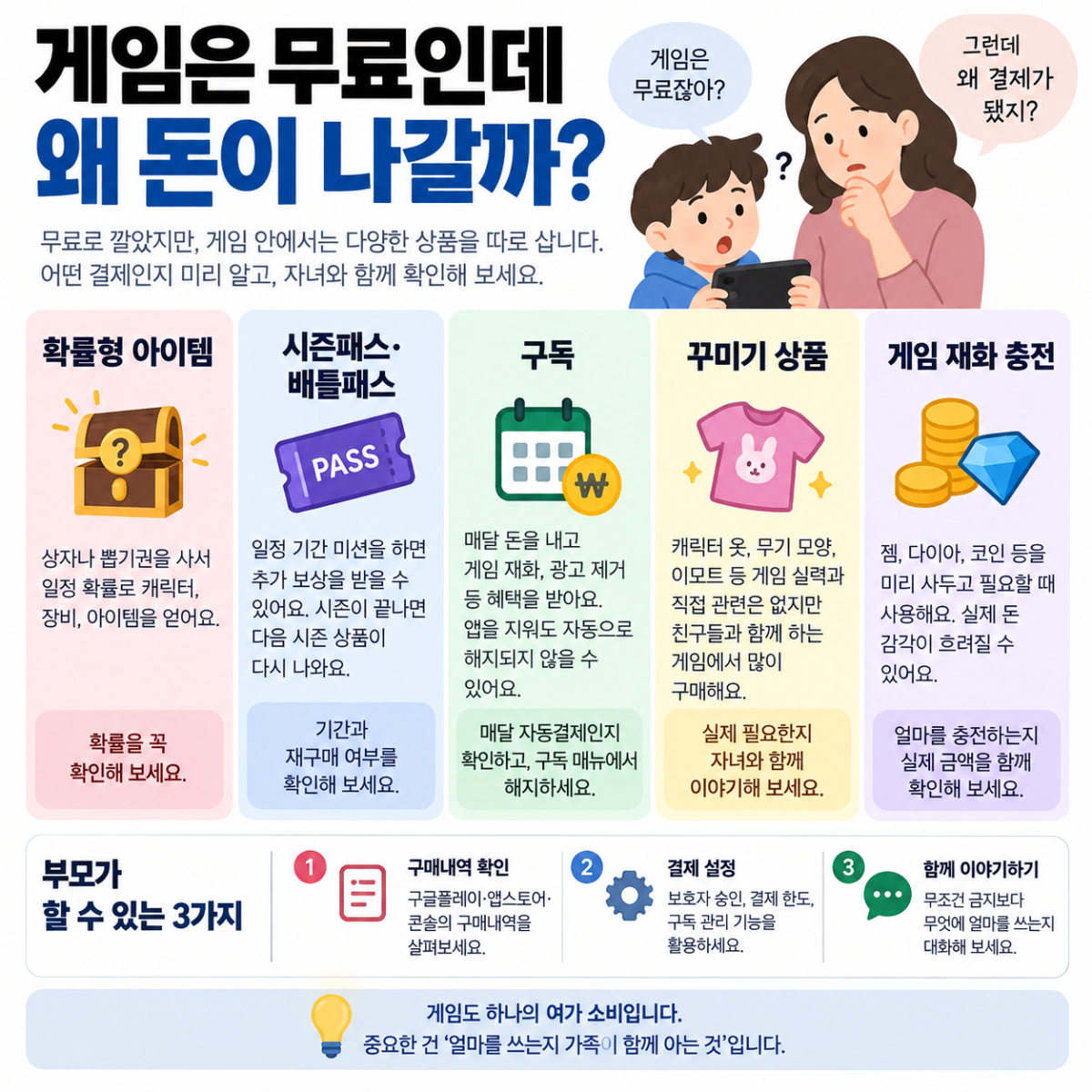
The game was downloaded for free, so why is money being spent? This is the most confusing point for parents when checking their children's smartphones during the Chuseok holiday. While app installation is free, items, characters, passes, and subscription products are sold separately within the game. Just because a game is free does not mean spending inside the game is also free.
Payment methods in games vary. The most familiar is "gacha." Players pay to buy boxes or gacha tickets and receive characters, equipment, or items based on certain probabilities. If the desired item does not appear immediately, multiple payments may be required. In Korea, disclosure of probability-based item information is mandatory, so players can check the odds within the game or on its website.
There are also season passes and battle passes. These are products that offer additional rewards for completing missions over a set period. Although they may appear to be one-time purchases, new season products are released when each season ends. From a parent's perspective, these may seem like single transactions, but they can actually result in recurring expenses every few months.
Subscription products also require caution. These services provide daily in-game currency or ad removal in exchange for monthly payments. Deleting the app does not automatically cancel the subscription. It must be canceled separately through the "Subscriptions" menu on Google Play or the App Store.
There are many cosmetic items such as character outfits, weapon skins, and dance emotes. Even if they appear unrelated to gameplay skills, they can be important to children. In games played with friends, a child might feel left out thinking, "I'm the only one with the default character." Instead of dismissing them as useless outright, it is better to first ask what your child wants to buy and why.
The first step for parents is to check purchase history. On Android phones, purchase records and recurring payments can be viewed via Google Play. For iPhones, check the "Purchase History" and "Subscriptions" menus in the Apple account settings. For console games, payment limits and purchase request features can be configured through PlayStation or Xbox family settings.
Refunds are not always available. Items already used or in-game currency that has been spent may be difficult to refund. Therefore, it is better to set rules before making a payment rather than arguing afterward. For example, set a monthly spending limit for games and require parental approval for any transaction exceeding a certain amount.
There is no need to automatically treat in-game spending as a problem. Gaming is just one form of leisure consumption, like movies, webtoons, or toys. What matters most is that the family collectively knows what the child is spending money on and how much. Simply verifying whether it is gacha-based, time-limited, or a recurring monthly expense can help reduce unnecessary spending.

 in TECH
